January 5 2026

Color and Pattern Detection

Creating a automated way to enforce dress code.

Importance

The Issue

Managing and implementing a dress code at a school or a workplace is not always efficient or just. Studies show that a significant portion of dress code enforcement is not fair, targeting female students and racial minorities. By automizing part of this process bias will decrease and dress code violations will be detected quickly and proficiently.

Part 1

Motion Detection Setup

This code initializes a webcam feed and configures background subtraction, noise-cleanup kernels, and thresholds to detect and track motion and color in video frames.


											# ------------------- Import -------------------
											import numpy as np
											import cv2
											import os
											import sys
											# importing libaries
											
											# ------------------- Color Detection Setup -------------------
											# Capturing video through webcam
											webcam = cv2.VideoCapture(0)
											num = 2000
											
											backSub = cv2.createBackgroundSubtractorMOG2(detectShadows=False) # create mask, 0 = still, 1 = moving
											kernel_motion = np.ones((5, 5), np.uint8) # kernel to clean up motion mask
											kernel = np.ones((5, 5), np.uint8) # kernel to clean up red mask
											
											PERSIST_FRAMES = 4
											pos_tolerance = 50 # pixels
											
											center = None
											distance = 50
											merged = False
											
											count = 0
											alert = False
											# ------------------- Motion Detection Setup -------------------
											MIN_CONTOUR_AREA = 2000 # area threshold
											KERNEL = cv2.getStructuringElement(cv2.MORPH_ELLIPSE, (5, 5)) # clean noise
											
											fgbg = cv2.createBackgroundSubtractorMOG2(history=500, varThreshold=25, detectShadows=True) # background subtractor
											

											# ------------------- Functions -------------------
											def box_overlap(b1, b2, tol=0): # checks if close enought to be same object
											return not (
											b1[2] + tol < b2[0] or
											b1[0] - tol > b2[2] or
											b1[3] + tol < b2[1] or
											b1[1] - tol > b2[3]
											)
											# --------------------------------------------------------------------------------------------------------------------
											
											def find_boxes (mask): #input variable
											
											mask = cv2.threshold(mask, 127, 255, cv2.THRESH_BINARY)[1] # makes sure corect color format
											contours, _ = cv2.findContours(mask, cv2.RETR_EXTERNAL, cv2.CHAIN_APPROX_SIMPLE) # contour contains all the x y cordinates of red regions' outlines
											
											boxes = [] #list to store contours
											for c in contours:
											if cv2.contourArea(c) < num:
											continue # skip small contours
											x, y, w, h = cv2.boundingRect(c) # bounding box cordinates
											boxes.append([int(x), int(y), int(x + w), int(y + h)]) # store contour in list
											
											return boxes #return updated frame
											# --------------------------------------------------------------------------------------------------------------------
											
											def get_color_mask(imageFrame, fg_mask, kernel, lower1, upper1, lower2=None, upper2=None):
											
											hsv = cv2.cvtColor(imageFrame, cv2.COLOR_BGR2HSV) # Convert the imageFrame in BGR(RGB color space) to HSV(hue-saturation-value) color space
											
											mask = cv2.inRange(hsv, lower1, upper1) # creates mask(grayscale image) - will only show color parts in white all else black - simplifies the box part
											
											if lower2 is not None: # if there is a second range for the color
											mask2 = cv2.inRange(hsv, lower2, upper2) # creates mask(grayscale image) - will only show color parts in white all else black - simplifies the box part
											mask = mask | mask2 # combines the two masks
											
											mask = cv2.bitwise_and(mask, fg_mask) # bitwise coverts each pizel to binary and "adds" them; 2 ones = 1 everything else = 0.
											
											mask = cv2.dilate(mask, kernel) # grows the white areas in the mask to make them thicker/less holes
											
											color_best = mask.astype(np.uint8) # ensure type
											if len(color_best.shape) == 3: # convert 3-channel to 1-channel if needed
											color_best = cv2.cvtColor(color_best, cv2.COLOR_BGR2GRAY)
											
											return color_best
											# --------------------------------------------------------------------------------------------------------------------
											

Part 2

Bounding Box and Color Mask Functions

This code defines functions to detect and track colored objects by finding bounding boxes, checking overlaps, and creating cleaned color masks from video frames.

Part 3

HSV Color Range Definitions

This code defines the HSV value ranges for different colors to create masks for detecting red, yellow, green, blue, and pink objects.


											# ------------------- Color Ranges -------------------
											# Set range for red color and define mask
											red_lower1 = np.array([0, 190, 170], np.uint8) # min color that is "red" (np.uint8 is storing the numbers from 0-255; increases by two to store larger numbers, np.uint16)
											red_upper1 = np.array([9, 255, 255], np.uint8) # max color that is "red"; defines in hue, saturation, value
											
											red_lower2 = np.array([176, 170, 140], np.uint8) # min color that is "red" (wrap around)
											red_upper2 = np.array([179, 255, 255], np.uint8) # max color that is "red" (wrap around)
											
											# Set range for yellow color and define mask
											yellow_lower = np.array([18, 150, 160], np.uint8)
											yellow_upper = np.array([25, 255, 255], np.uint8)
											
											# Set range for green color and define mask
											green_lower = np.array([26, 70, 160], np.uint8)
											green_upper = np.array([85, 255, 255], np.uint8)
											
											# Set range for blue color and define mask
											blue_lower = np.array([86, 120, 150], np.uint8)
											blue_upper = np.array([140, 255, 255], np.uint8)
											
											# Set range for pink color and define mask
											pink_lower = np.array([141, 100, 100], np.uint8)
											pink_upper = np.array([175, 255, 255], np.uint8)
											

											# -------------------
											while True:
											
											# ------------------- Color Detection -------------------
											color_bad = None
											_, imageFrame = webcam.read() # Reading the video from the webcam in image frames
											
											fg_mask = backSub.apply(imageFrame) # create motion mask
											fg_mask = cv2.morphologyEx(fg_mask, cv2.MORPH_OPEN, kernel_motion) # clean small dots
											fg_mask = cv2.morphologyEx(fg_mask, cv2.MORPH_DILATE, kernel_motion) # thicken moving regions
											
											used_boxes = [] # replaces used mask
											detections = [] # stores what to draw
											used_mask = np.zeros_like(fg_mask) # creates a 0 and 1 map - 0 not used, 1 used by other countour
											# --------------------------------------------------------------------------------------------------------------------
											
											# Red color
											red_best = get_color_mask(imageFrame, fg_mask, kernel, red_lower1, red_upper1, red_lower2, red_upper2)
											
											new_boxes = find_boxes(red_best) # call function, returns contours positions
											
											final_boxes = [] # list with final results
											for b in new_boxes: # process each box
											if any(box_overlap(b, ub, pos_tolerance) for ub in used_boxes): # check if overlaps boxes
											continue # if overlap, skip
											final_boxes.append(b) # passed all checks
											used_boxes.append(b) # mark as used
											
											for b in final_boxes: # do per object
											detections.append((b, "Red Colour", (0, 0, 255))) # draw
											color_bad = "red"
											

Part 4

Real-Time Red Color Detection Loop

This code continuously captures webcam frames, detects motion, applies a red color mask, finds non-overlapping red objects, and stores them for drawing or tracking.

Part 5

Pink and Green Color Detection

This code detects pink and green objects in each frame, finds their bounding boxes, avoids overlaps with previously detected objects, and stores them for tracking or drawing.


											# Pink color
											pink_best = get_color_mask(imageFrame, fg_mask, kernel, pink_lower, pink_upper)
											
											new_boxes = find_boxes(pink_best)
											
											final_boxes = []
											for b in new_boxes:
											if any(box_overlap(b, ub, pos_tolerance) for ub in used_boxes):
											continue
											final_boxes.append(b)
											used_boxes.append(b)
											
											for b in final_boxes:
											detections.append((b, "Pink Colour", (147, 20, 255)))
											color_bad = "pink"
											
											# Green color
											green_best = get_color_mask(imageFrame, fg_mask, kernel, green_lower, green_upper)
											
											new_boxes = find_boxes(green_best)
											
											final_boxes = []
											for b in new_boxes:
											if any(box_overlap(b, ub, pos_tolerance) for ub in used_boxes):
											continue
											final_boxes.append(b)
											used_boxes.append(b)
											
											for b in final_boxes:
											detections.append((b, "Green Colour",(0, 255, 0)))
											color_bad = "green"
											

											# Blue color
											blue_best = get_color_mask(imageFrame, fg_mask, kernel, blue_lower, blue_upper)
											
											new_boxes = find_boxes(blue_best)
											
											final_boxes = []
											for b in new_boxes:
											if any(box_overlap(b, ub, pos_tolerance) for ub in used_boxes):
											continue
											final_boxes.append(b)
											used_boxes.append(b)
											
											for b in final_boxes:
											detections.append((b, "Blue Colour", (255, 0, 0)))
											
											# Yellow color
											yellow_best = get_color_mask(imageFrame, fg_mask, kernel, yellow_lower, yellow_upper)
											
											new_boxes = find_boxes(yellow_best)
											
											final_boxes = []
											for b in new_boxes:
											if any(box_overlap(b, ub, pos_tolerance) for ub in used_boxes):
											continue
											final_boxes.append(b)
											used_boxes.append(b)
											
											for b in final_boxes:
											detections.append((b, "Yellow Colour", (0, 255, 255)))
											color_bad = "yellow"
											

Part 6

Blue and Yellow Color Detection

This code detects blue and yellow objects in each video frame, finds their bounding boxes, filters out overlaps with previously detected objects, and adds them to the list of detections for tracking or drawing.

Part 7

Drawing Detections and Alert System

This code draws rectangles and labels around all detected objects on the video frame, checks if any of the tracked colors (red, pink, green, or yellow) are present, prints a detection message if so, and sets an alert flag accordingly.


											# -------
											for (x1, y1, x2, y2), label, color in detections:
											cv2.rectangle(imageFrame, (x1, y1), (x2, y2), color, 2)
											cv2.putText(imageFrame, label, (x1, y1 - 5), cv2.FONT_HERSHEY_SIMPLEX, 0.7, color, 2)
											if color_bad == "pink" or color_bad == "red"or color_bad == "green" or color_bad == "yellow":
											print("Red/yellow/green/pink is detected.")
											
											alert = True
											
											else:
											alert = False
											

											# ------------------- Motion/Pattern Detection -------------------
											ret, frame = webcam.read()
											if not ret:
											break
											
											# apply background subtraction
											fgmask = fgbg.apply(frame)
											fgmask = cv2.morphologyEx(fgmask, cv2.MORPH_OPEN, KERNEL) # remove small noise
											fgmask = cv2.morphologyEx(fgmask, cv2.MORPH_DILATE, KERNEL, iterations=2) #enlarge moving areas
											
											# find moving objects
											contours, _ = cv2.findContours(fgmask, cv2.RETR_EXTERNAL, cv2.CHAIN_APPROX_SIMPLE) # find contours in mask
											
											for cnt in contours: # process each contour
											if cv2.contourArea(cnt) < MIN_CONTOUR_AREA: # skip small areas
											continue
											
											x, y, w, h = cv2.boundingRect(cnt) # get bounding box
											person_roi = frame[y:y+h, x:x+w] # cropped region of interest for the person
											
											# convert to grayscale
											gray = cv2.cvtColor(person_roi, cv2.COLOR_BGR2GRAY)
											gray = cv2.GaussianBlur(gray, (5, 5), 0) # reduce noise
											
											# detect edges (structural patterns)
											edges = cv2.Canny(gray, 50, 150)
											
											# detect repeated structures using contours in edges
											pattern_contours, _ = cv2.findContours(edges, cv2.RETR_EXTERNAL, cv2.CHAIN_APPROX_SIMPLE)
											pattern_count = sum(1 for pc in pattern_contours if cv2.contourArea(pc) > 61) # small threshold
											
											if pattern_count > 13: # if enough patterns detected
											cv2.putText(frame, "Pattern Detected", (x, y-10), cv2.FONT_HERSHEY_SIMPLEX, 0.6, (0, 255, 255), 2) # label
											print("Pattern is detected.")
											
											# draw bounding box around person
											cv2.rectangle(frame, (x, y), (x+w, y+h), (0, 255, 0), 2)
											

Part 8

Motion and Pattern Detection

This code detects moving objects in the webcam feed using background subtraction, isolates each moving region, converts it to grayscale, applies edge detection, counts significant structural patterns, labels the frame if enough patterns are found, draws bounding boxes around the moving objects, and prints alerts.

Part 9

Program Termination

This code displays the color and pattern detection video windows, waits for the user to press "q" to quit, clears the terminal, and then releases the webcam and closes all OpenCV windows to safely terminate the program.


											# Program Termination
											cv2.imshow("Color Detection in Real-Time", imageFrame) # show the actual frame
											cv2.imshow("Pattern Detection", frame)
											if cv2.waitKey(1) & 0xFF == ord("q"):
											
											os.system('cls' if os.name == 'nt' else 'clear')
											break
											
											webcam.release()
											cv2.destroyAllWindows()
											

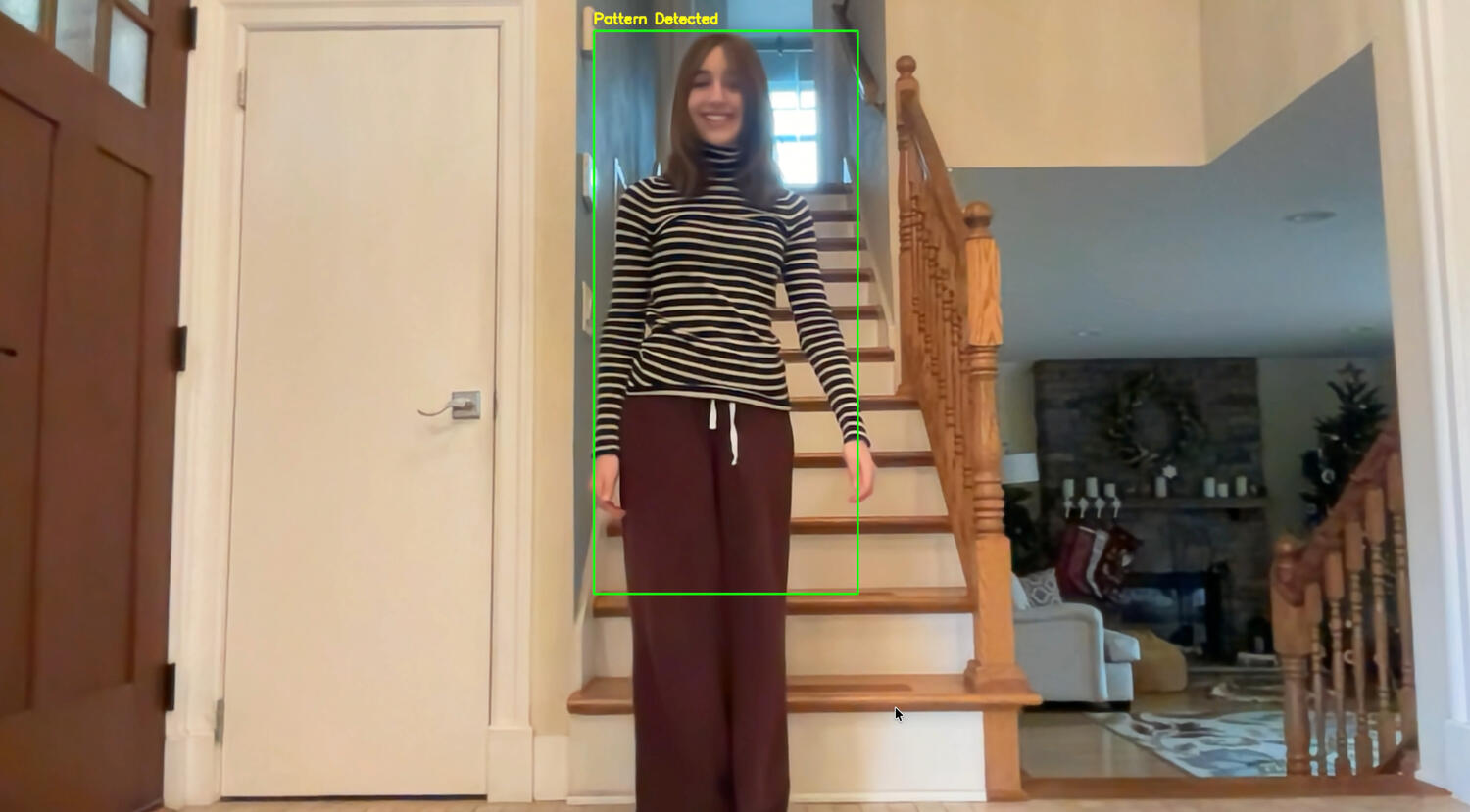
Example of Color Detection

*Terminal prints not shown
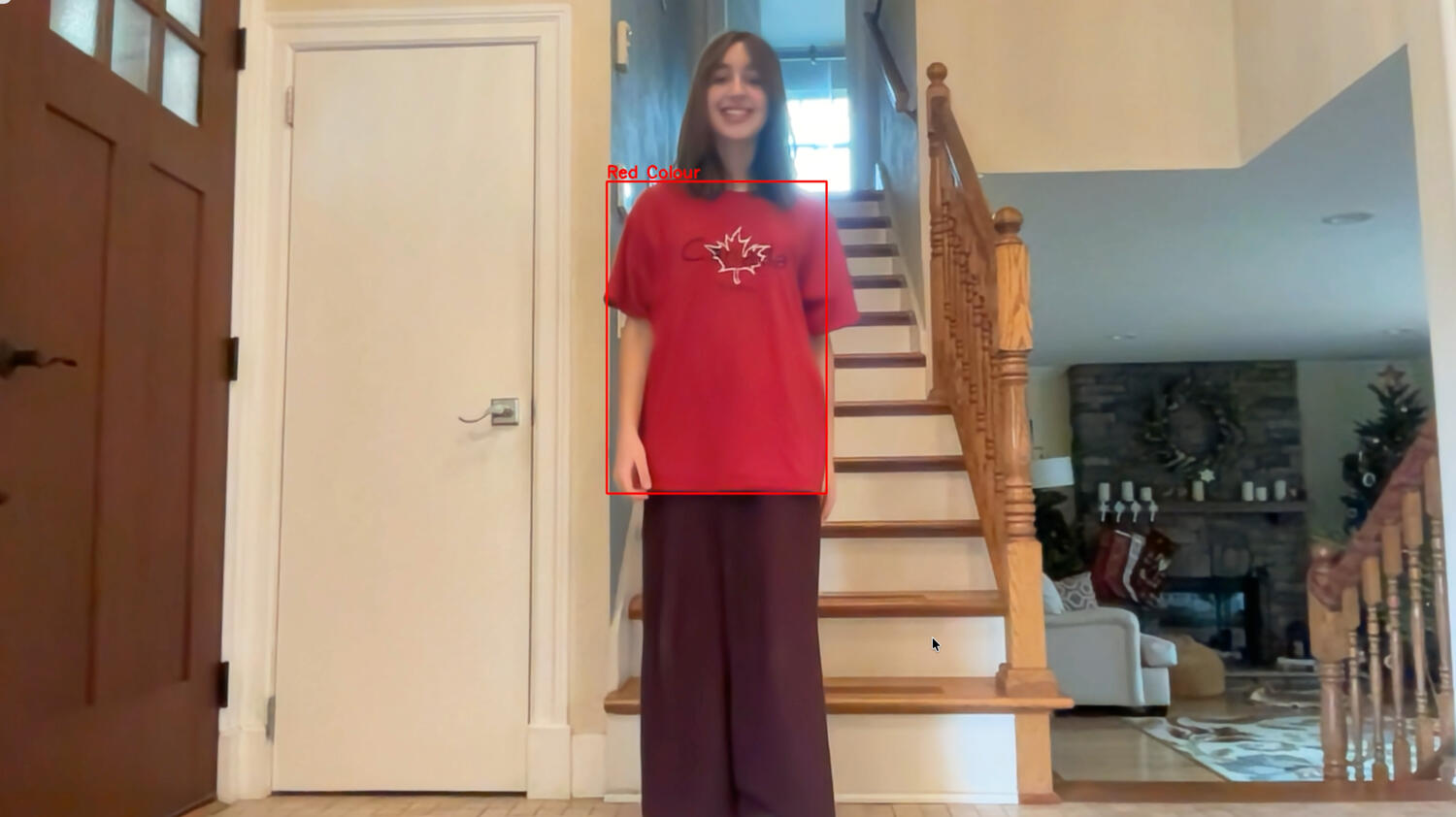
Example of Pattern detection

*Terminal prints not shown

Video

Program Demos & Explanations

Videos showing the program in its entirety.

33 seconds

Short Video

Explains basic workflow of the code.

1 minute 34 seconds

Longer Video

Explains the code more in depth.

1 minute 3 seconds

Demo Video

Shows the product of the code.

The Creator

Dasha Katkova

Thank you